
Schema Evolution and Compatibility Rules
Master schema evolution modes in Schema Registry, understand backward vs forward compatibility, and prevent breaking changes with CI/CD gates.
In enterprise microservice architectures, schemas are not static. Business requirements constantly evolve: new attributes are introduced, obsolete fields are deprecated, and data structures are refined.
However, in distributed systems with dozens of independent deployment pipelines, you cannot coordinate a simultaneous deployment of every producer and consumer. Producers and consumers run at different versions concurrently.
To prevent breaking downstream services, Schema Registry enforces compatibility rules. Before a new schema version is accepted into the registry, its compatibility against existing versions is verified. If the proposed change breaks consumers, the registration is rejected.
01Compatibility modes explained
Schema Registry provides several compatibility modes that dictate how schemas can evolve over time.
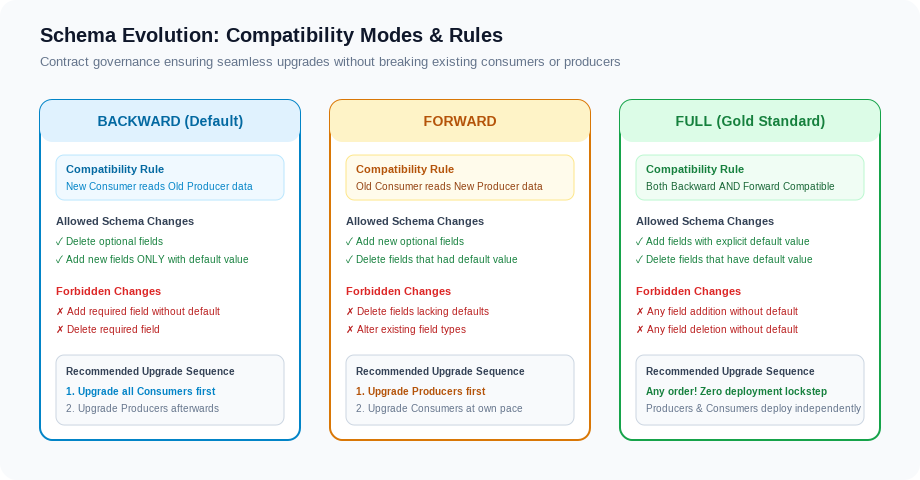
BACKWARD compatibility (Default)
Under BACKWARD compatibility, a consumer using the new schema can read data written by producers using the previous schema.
Producer (Old Schema v1) ───[Produces data]───> Kafka
                                                  │
                                                  ▼
Consumer (New Schema v2) <───[Reads data]────────┘
Allowed changes
- Add new fields: The new field must provide a default value. When reading old data where the field does not exist, the consumer uses the default.
- Delete fields: You can delete any field that was optional in previous versions.
Forbidden changes
- Adding a required field that lacks a default value.
- Deleting a required field.
Deployment rule
Always upgrade consumers first. Once all consumers are running the new schema version, upgrade the producers.
FORWARD compatibility
Under FORWARD compatibility, a consumer using the previous schema can read data written by producers using the new schema.
Producer (New Schema v2) ───[Produces data]───> Kafka
                                                  │
                                                  ▼
Consumer (Old Schema v1) <───[Reads data]────────┘
Allowed changes
- Add new fields: You can add new fields without defaults because old consumers simply ignore unrecognized fields.
- Delete fields: You can only delete fields that had a default value in previous versions.
Forbidden changes
- Deleting fields that lack a default value.
- Altering existing data types.
Deployment rule
Always upgrade producers first. Consumers can then be upgraded at their own pace.
FULL compatibility
Under FULL compatibility, schemas are both BACKWARD and FORWARD compatible.
A consumer using the new schema can read old data, and a consumer using the old schema can read new data.
Allowed changes
- Add fields: Must provide an explicit default value.
- Delete fields: Must have had an explicit default value.
Deployment advantage
Any deployment order is supported. Producers and consumers can be upgraded independently in any sequence without service disruption or coordination meetings between teams.
Transitive compatibility modes
By default, compatibility modes check the proposed schema against only the latest registered version (version - 1).
However, in Kafka, topics often retain data for days, months, or years. A consumer starting from offset 0 may need to read messages produced against version 1, even if the current schema is at version 5.
To protect against breaking older stored messages, use TRANSITIVE modes:
| Mode | Verification Scope |
|---|---|
BACKWARD_TRANSITIVE | New schema can read data written with all previous versions |
FORWARD_TRANSITIVE | All previous schemas can read data written with new schema |
FULL_TRANSITIVE | All previous versions are mutually compatible with the new schema |
Loading the rest of the lesson…