ProLesson 9.4Intermediate7 min readUpdated 31 October 2026
Production Troubleshooting Handbook: 5 Critical Outages
Diagnose and resolve the five most common Kafka production outages: under-replicated partitions, lag spikes, rebalance storms, disk full, and quorum loss.
Operating distributed systems in production guarantees that incidents will eventually occur: hardware fails, network partitions drop packets, rogue producers flood partitions with bad payloads, and disks fill up.
When an alert pages the on-call engineer at 2:00 AM, following an ad-hoc debugging process increases mean-time-to-recovery (MTTR) and risks compounding the incident.
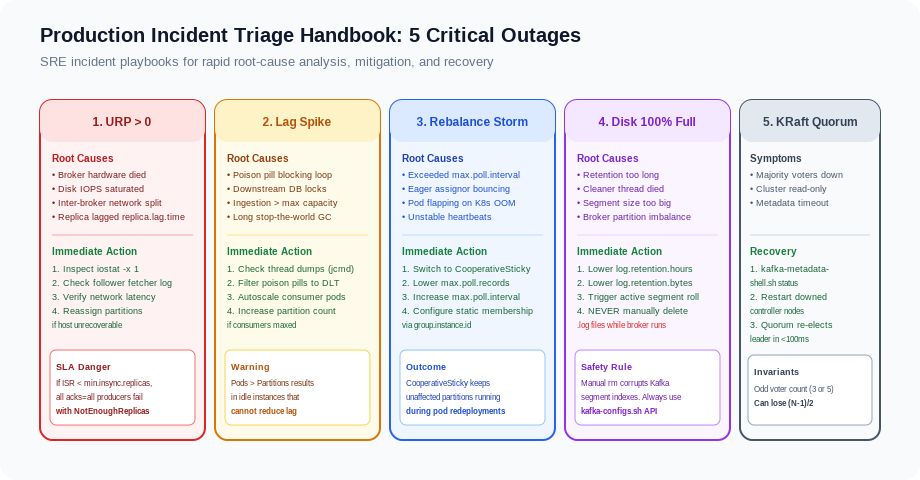
This handbook details the root causes, diagnostic commands, and recovery playbooks for the five most critical production Kafka outages.
Fig. 1 · Production Troubleshooting Handbook
01Outage 1: Under-Replicated Partitions (URP > 0)
Symptoms
Prometheus alert: UnderReplicatedPartitions > 0 firing for more than 5 minutes.
Producers with acks=all begin throwing NotEnoughReplicasException.
Cluster dashboard shows one or more brokers missing from the In-Sync Replicas (ISR) list.
Root causes
Broker process or node crash: Hardware failure, OOM killer termination, or ungraceful shutdown.
Disk I/O saturation: Follower broker cannot write data to disk fast enough to keep up with the leader within replica.lag.time.max.ms (default 30,000 ms).
Resolution: If the node crashed, restart it. If the broker is permanently unrecoverable, remove it from the cluster and trigger a partition reassignment using kafka-reassign-partitions.sh to move replicas onto healthy brokers.