
Kafka vs Traditional Message Brokers
Compare the architectural trade-offs of smart brokers like RabbitMQ and SQS against Kafka's dumb broker, smart consumer commit log model.
Engineers often ask whether they should use Apache Kafka or a traditional message broker like RabbitMQ, ActiveMQ, or Amazon SQS. While both categories move data between systems asynchronously, they are designed around fundamentally different architectural philosophies.
Choosing the wrong technology leads either to operational misery under high data volume or unnecessary complexity for simple task processing.
In this lesson, you will evaluate the core differences between traditional message queues and Kafka, and learn the exact criteria for choosing the right tool for your system.
01Smart Broker, Dumb Consumer vs Dumb Broker, Smart Consumer
The most profound philosophical difference between traditional message brokers and Apache Kafka lies in where system intelligence and state management reside.
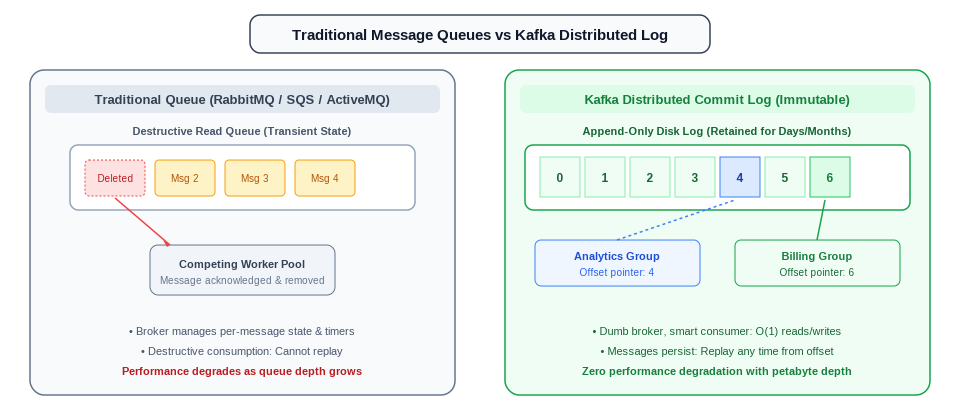
Traditional Brokers: Smart Broker, Dumb Consumer
In systems like RabbitMQ or ActiveMQ, the broker is "smart":
- Per-Message State Tracking: The broker tracks the delivery state of every individual message (e.g.,
Ready,Unacknowledged,Acknowledged,Dead-Lettered). - Complex Routing: Brokers use exchange topologies, routing keys, headers, and topic wildcards to inspect message metadata and route each record to specific queues.
- Destructive Read: Once a consumer acknowledges that a message has been processed, the broker deletes it from memory and disk.
- The Depth Degradation Problem: Because the broker tracks state per message, performance degrades as unconsumed queue depth grows. When a consumer slows down and millions of messages accumulate, the broker must page records out of RAM onto disk, leading to severe latency spikes and potential crashes.
Apache Kafka: Dumb Broker, Smart Consumer
Kafka inverts this model:
- Append-Only Log: The broker does not track individual message delivery. It simply appends bytes to disk logs in sequential order.
- Consumer-Managed State: Consumers track their own reading position by keeping track of an integer offset. Reading a record does not modify the broker log or delete any data.
- Constant Performance (O(1)): Kafka performance is independent of data volume. Whether a topic has 10 messages or 10 billion messages, writing a new record and reading from an offset require the exact same constant-time disk operations.
02Architectural Comparison Matrix
| Architectural Feature | Traditional Message Queue (RabbitMQ / SQS) | Event Streaming Log (Apache Kafka) |
|---|---|---|
| Primary Data Model | Ephemeral, transient task queue | Distributed, partitioned commit log |
| Message Consumption | Destructive read (message deleted upon ACK) | Non-destructive read (retained on disk) |
| Message Replay | Not natively supported | First-class capability (rewind offsets at will) |
| Throughput Capacity | 10,000 to 100,000 messages/sec per broker | 1,000,000+ messages/sec per broker |
| Ordering Guarantees | FIFO within a single queue, broken by retries | Strict chronological order within each partition |
| Consumer Scaling | Competing consumers on a single queue | Partition-based consumer group parallelism |
| Message Routing | Complex dynamic routing (AMQP exchanges, topics, headers) | Partition key hashing or custom partitioners |
| Data Retention | Seconds to hours (until consumer ACK) | Days, months, years, or infinite retention |
03What About Apache Pulsar?
You may also encounter Apache Pulsar, which positions itself between Kafka and traditional messaging:
- Separated Compute and Storage: Pulsar decouples stateless broker nodes from stateful storage nodes (using Apache BookKeeper).
- Flexible Consumption Modes: Pulsar supports both Kafka-like partition consumption and RabbitMQ-like shared worker subscriptions natively.
- Trade-Off: While Pulsar offers independent scaling of storage and compute, it introduces substantial operational complexity, requiring operators to manage three separate distributed clusters (ZooKeeper/KRaft metadata, BookKeeper storage daemons, and Pulsar brokers). For most production workloads, Kafka's unified architecture provides superior operational simplicity and unmatched ecosystem maturity.
04Decision Framework: When to Choose Which
When to Choose Traditional Message Queues (RabbitMQ / SQS)
Traditional queues excel when your focus is on individual task execution and work distribution:
- Complex Routing Logic: You need to route messages dynamically based on multiple AMQP headers, binding patterns, or routing keys.
- Individual Message Acknowledgment: You need fine-grained control to acknowledge, reject, or requeue specific individual messages out of order.
- Task Queues & Worker Pools: You are processing background tasks (e.g. video rendering, image resizing, sending SMS notifications) where messages should vanish once handled.
- Low Operational Overhead for Small Loads: Running an AWS SQS queue or a lightweight RabbitMQ container is simpler for small applications that do not need high-throughput data pipelines.
When to Choose Apache Kafka
Kafka is the standard choice when your system revolves around event streams, high throughput, and data persistence:
- High-Throughput Ingestion: You process thousands or millions of events per second (e.g. IoT telemetry, clickstreams, financial transactions, logs).
- Publish-Subscribe Fan-Out with Replayability: Multiple decoupled services must read the same stream of events at different speeds, and new services must be able to backfill historical state.
- Event Sourcing and Audit Trails: The log of events is the system of record. You cannot afford to delete business history upon processing.
- Stream Processing: You want to perform real-time windowed aggregations, table joins, and stateful transforms using Kafka Streams or Apache Flink.
05In the interview
- Can RabbitMQ handle message replay? RabbitMQ deletes messages as soon as consumers acknowledge them, making native replay impossible unless an external archiving system is built. Kafka stores records durably for configurable retention periods, enabling instant replay by resetting consumer offsets.
- Why does queue depth affect RabbitMQ more than Kafka? RabbitMQ maintains per-message in-memory state and indices. When queues grow to millions of messages, memory pressure forces disk paging, reducing throughput. Kafka writes sequentially to disk logs with O(1) complexity, so performance remains constant regardless of whether the log holds ten or ten million records.
06Check your understanding
Quiz · 4 questions
0 of 4 answered
1. Why does Kafka maintain consistent performance even when consumers fall millions of messages behind?
2. In what scenario is a traditional message broker like RabbitMQ preferable to Apache Kafka?
3. What happens in Kafka if a consumer attempts to acknowledge message offset 10 while offset 8 is still failing?
4. How do RabbitMQ and Kafka differ in their handling of message consumption?