
How Kafka Stores Data: Segments, Indexes & Zero-Copy
Understand the physical disk layout of Kafka partition segments, sparse index mechanics, the OS page cache, and Linux sendfile zero-copy data transfer.
Many engineers assume that writing to disk is inherently slow and that distributed message systems must keep all data in RAM to achieve high throughput. Yet Apache Kafka sustains gigabytes of write throughput per second while writing every single record to persistent storage.
How does Kafka achieve in-memory speeds while writing directly to physical disk?
In this lesson, you will explore the physical directory layout of Kafka partitions, how sparse indexes work, why Kafka delegates caching to the Linux operating system, and how the sendfile() system call eliminates CPU memory copies.
01The Physical Directory and Segment Files
On the broker filesystem, each partition corresponds to a directory inside the configured log.dirs path. For example, Partition 0 of the orders topic lives in:
/var/lib/kafka/data/orders-0/If Kafka stored an entire partition in a single massive file, deleting expired messages or searching for an offset would require scanning gigabytes of disk bytes.
Instead, Kafka splits each partition log into multiple smaller immutable files called Segments.
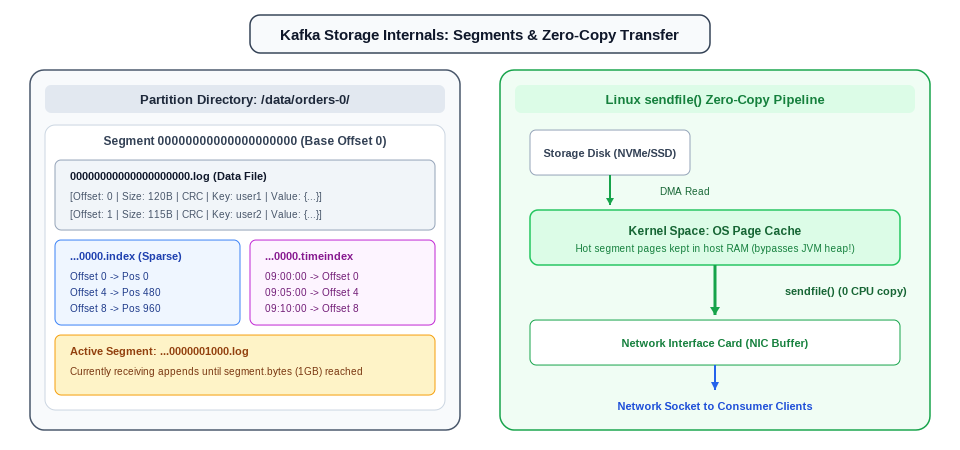
The Three Files of a Segment
Every segment is named after its base offset (the offset of the first record in that segment), padded to 20 digits:
00000000000000000000.log
00000000000000000000.index
00000000000000000000.timeindex
00000000000010485760.log
00000000000010485760.index
00000000000010485760.timeindex
leader-epoch-checkpoint
Each segment consists of three coordinated files:
- The Log File (
.log): The actual sequential binary data file containing serialized records, record batches, CRC checksums, keys, headers, and payloads. - The Offset Index File (
.index): A memory-mapped file that maps logical record offsets to their exact physical byte positions in the.logfile. - The Time Index File (
.timeindex): Maps message timestamps to logical offsets, enabling consumers to rewind or query records by point in time (for example, replaying all messages from 08:00 AM).
Active vs Closed Segments
At any given time, only one segment per partition is the Active Segment.
- Incoming producer writes append strictly to the active segment.
- Older segments are Closed (read-only). Kafka never modifies a closed segment.
- Kafka rolls the active segment and creates a new one when
segment.bytesis reached (default 1 GB) or whensegment.mselapses (default 7 days).
Loading the rest of the lesson…