
What is Low-Level Design?
Learn what low-level design means, how it differs from high-level design, and what interviewers look for when they ask you to design the classes of a real-world system.
Imagine you want to build a house. First, an architect decides how many floors it has, where the kitchen and bedrooms go, and how the water and electricity reach the house. Then a builder decides how each room is made: where the switches sit, how the cupboards open, which pipes connect to which tap.
Software design works the same way. There are two zoom levels, and a good engineer can move between them. High-level design is the architect's view. Low-level design is the builder's view. This track is about the builder's view: how to design the classes and objects inside a system so that the code is easy to understand, easy to change and hard to break.
By the end of this lesson you will know what low-level design (LLD) is, what an LLD interview looks like, what you are expected to produce, and what interviewers quietly check while you work.
01Two zoom levels of the same system
Take a parking system for a shopping mall. Cars arrive, take a ticket, park, and pay when they leave.
At the high level, you look at the system from far away. You see large parts: the mobile app, the servers, a load balancer that spreads the traffic, the database that stores tickets, maybe a cache. You decide which parts exist and how they talk to each other. You worry about questions like "what if one million people use the app at once?"
At the low level, you zoom into one of those parts, for example the parking service. Inside it you see classes such as ParkingLot, Floor, Spot and Ticket. You decide what data each class holds, what each class is responsible for, and how the objects work together when a car enters. You worry about questions like "where should the rule 'which spot is the nearest free one' live?"
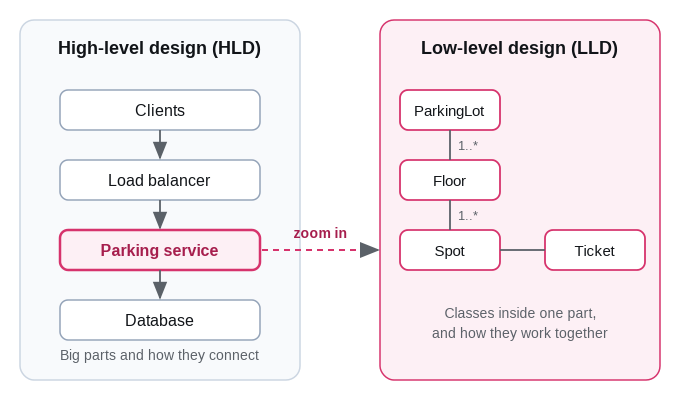
Here is a side-by-side view:
| High-level design (HLD) | Low-level design (LLD) | |
|---|---|---|
| The question it answers | Which big parts do we need, and how do they connect? | Which classes do we need inside a part, and what does each one do? |
| What you draw | Boxes and arrows: services, databases, queues, caches | Class diagrams: classes, fields, methods, relationships |
| Main worry | Scale, speed, reliability, cost | Clarity, correct responsibilities, ease of change |
| Typical words | Load balancer, replica, shard, message queue | Class, interface, object, method, pattern |
| Parking example | App, API servers, database, payment service | ParkingLot, Spot, Ticket, PricingStrategy |
Neither level is "more important". A system with a perfect high-level design but messy classes becomes painful to change. A system with beautiful classes but no plan for scale collapses under traffic. In this track we focus on the low level, and later you will see how it connects to the high level.
02What an LLD problem looks like
In an LLD interview, the problem is usually one short sentence. For example:
- "Design a parking lot."
- "Design a vending machine."
- "Design a library management system."
- "Design a game of Tic-Tac-Toe."
The sentence is short on purpose. Real projects also start with vague ideas, and part of the job is to turn a vague idea into clear rules. So the interviewer is not only checking whether you can write classes. They are checking how you think when the problem is not fully defined.
A common mistake is to hear "parking lot" and immediately start writing a ParkingLot class. A better engineer first asks: how many floors are there? Are there different sizes of vehicles? Is parking free or paid? What happens when the lot is full? These questions are not a delay. They are the first and most important part of the answer.
03What you are expected to produce
You are not expected to write a complete, running application in 45 minutes. You are expected to show a clear, well-reasoned design. Most LLD rounds expect these five things:
- Clear requirements. A short list of what the system must do and what it will not do. You build this by asking questions.
- Classes and interfaces. The main building blocks, each with a clear name and one clear job.
- Relationships. How the classes are connected, usually shown as a class diagram. Does a
Floorown manySpotobjects? Does aTicketpoint to oneSpot? - Key code. The important parts only: the main interfaces, the core method that holds the real logic, and a short example of how the pieces are used. Not getters, setters and boilerplate.
- Trade-offs and extensions. Your reasons for the choices you made, and how the design would handle a new requirement, for example "now add electric charging spots".
In the next lesson we turn these five outputs into a repeatable step-by-step method.
04What interviewers quietly check
While you talk and draw, the interviewer is usually watching for a handful of signals. Knowing them helps you decide what to say out loud.
| Signal | What it looks like | A warning sign |
|---|---|---|
| You clarify first | You ask about users, rules, limits and what is out of scope | You start drawing in the first minute |
| Sensible classes | Each class has one clear job and a name that says what it is | One giant class that does everything |
| Ease of change | A new rule means adding a class, not editing ten places | Every new feature touches old, working code |
| Patterns with a reason | You use a pattern because a problem needs it, and you can explain why | You force a pattern in because you memorised it |
| Clean naming and structure | Names read like plain English | Names such as Manager, Helper, Data for everything |
| You think aloud | You explain your choices and mention trade-offs | You work silently and show only the result |
Notice that none of these signals is "wrote the most code". The best LLD answers are often short and tidy.
05A first taste: the notification example
Let us see the heart of LLD with a tiny example. Suppose an app must tell users that their order has shipped, by email. A first attempt might look like this:
public class NotificationService {

    public void send(String channel, String to, String message) {
        if (channel.equals("EMAIL")) {
            // build an email and send it
        } else if (channel.equals("SMS")) {
            // call the SMS gateway
        }
        // adding "PUSH" later means editing this method again
    }
}
This works today. The trouble starts next month, when the business says: "Please also send push notifications, and for some users WhatsApp." Each new channel means opening this same method, adding another branch, and hoping you do not break the email or SMS code that already works. Testing becomes harder too, because every channel is tangled in one place.
Now look at a better shape:
public interface Notifier {
    void send(String to, String message);
}

public class EmailNotifier implements Notifier {
    public void send(String to, String message) { /* send an email */ }
}

public class SmsNotifier implements Notifier {
    public void send(String to, String message) { /* call the SMS gateway */ }
}

public class NotificationService {
    private final Notifier notifier;

    public NotificationService(Notifier notifier) {
        this.notifier = notifier;
    }

    public void notifyUser(String to, String message) {
        notifier.send(to, message);
    }
}
Read this slowly. Notifier is a promise: "anything that can send a message to someone". EmailNotifier and SmsNotifier keep that promise in different ways. NotificationService does not know or care which one it receives. To add push notifications you write one new class, PushNotifier, and you do not touch any of the existing code.
This single idea, "depend on a promise, not on a specific implementation, so new behaviour is a new class and not an edit", is the heart of low-level design. Later modules give it names, the Open/Closed Principle and the Strategy pattern, and show you many more shapes like it. For now, just notice how much calmer the second design feels when a requirement changes.
06Common mistakes
- Coding in the first minute. You may build the wrong thing. Spend the first minutes on questions and requirements.
- Using patterns everywhere. A pattern is a tool for a specific problem. Adding one "to look advanced" makes the design harder to read, not better.
- One giant class. If a class stores data, applies every rule and talks to the database, it will be hard to test and change.
- Never asking about rules and limits. Hidden assumptions are the main reason designs fail later.
- Forgetting to talk about change. Many interviewers end with "what if we add this feature?" Prepare to answer it.
07In the interview
- Do I have to write complete working code in an LLD round? No. Interviewers mostly want the classes, the relationships and the key logic. Show the important interfaces and the core method, and describe the rest.
- What should I do first when I get a one-line problem? Ask clarifying questions about the users, the rules, the limits and what is out of scope, and write the answers down before you draw anything.
- How do I show that my design can grow? Pick one likely new requirement, explain which class you would add, and point out that the existing classes stay unchanged.
08Check your understanding
Quiz · 4 questions
0 of 4 answered
1. A teammate says: we will add a load balancer and a cache in front of the parking service. Which kind of design is this?
2. You are asked to design a vending machine and the problem is only one sentence long. What should you do first?
3. In the notification example, why is a Notifier interface better than an if/else on the channel name?
4. Which of these is a sign of a weak LLD answer?
09Practice
Pick any app you use daily, such as a food delivery app. Write down three classes you think exist inside it and one sentence describing the job of each. Then ask yourself whether any class has more than one job. This is exactly the thinking you will practise in the next lessons.